
Black Myth: Wukong's Compatibility Mode - A Lifesaver for Aging PCs
Unlock smoother gameplay in Black Myth: Wukong with compatibility mode—boost stability and fix crashes on older PCs for a seamless adventure.
So, you've finally decided to embark on the epic, visually stunning journey of Black Myth: Wukong, only to be greeted by a slideshow of lag, mysterious black screens, or the dreaded crash-to-desktop. Don't despair, fellow digital pilgrim! Your trusty (or perhaps slightly dusty) PC might just need a little help from a feature called compatibility mode. Think of it as the game putting on a pair of reading glasses—it might not see everything in crystal-clear 4K detail, but it gets the job done without tripping over its own feet. In 2026, with the game's performance demands still being a hot topic, knowing when and how to use this mode is more relevant than ever.
What Does Compatibility Mode Actually Do?
In a nutshell, compatibility mode is the game's built-in humility mode. It's like the Monkey King himself deciding to use a fraction of his power so he doesn't accidentally blow up the mountain he's standing on. For Black Myth: Wukong, this mode selectively dials down or turns off certain graphical bells and whistles that are designed for the latest, most powerful gaming rigs. This sacrifice allows the adventure to run on older or less powerful setups that would otherwise struggle, cough, and splutter under the game's hefty demands. It's a trade-off: stability and playability in exchange for some visual splendor.
Key sacrifices in compatibility mode include:
-
Lower Framerate: The game might not feel as buttery smooth.
-
Reduced Visual Fidelity: Textures, shadows, and lighting effects take a hit. It's the difference between a cinematic masterpiece and a very good-looking video game.
-
Simplified Effects: Some of the flashiest spell and particle effects might be toned down.
Should You Even Bother With It?
Hold your horses! Before you rush to enable it, you gotta ask yourself: "Do I really need this?" The developers at Game Science didn't craft this breathtaking world for you to experience it on low settings if you don't have to. The golden rule is: always try the default, standard mode first. Give your PC a chance to strut its stuff. Only if you encounter the following party crashers should you consider the switch:
| Symptom | Probable Cause | Compatibility Mode as Cure? |
|---|---|---|
| Consistent lag/stuttering | GPU or CPU struggling | ✅ Very likely |
| Frequent crashes | Memory or stability issues | ✅ Potentially |
| Black screens on launch | Driver or compatibility conflict | ✅ Often helps |
| Game runs... but like a slideshow | System below recommended specs | ✅ Absolutely |
A quick heads-up for console warriors: this mode is a PC-exclusive feature. Your PlayStation or Xbox already has its settings optimized, so you're good to go!
How to Flip the Switch (It's Easier Than Finding a Real Peach of Immortality)
Activating compatibility mode is a piece of cake, though the steps differ slightly depending on your digital storefront of choice.
For Steam Users (The Classic Path):
-
Fire up your Steam library and locate Black Myth: Wukong.
-
Click the big, tempting "Play" button as usual.
-
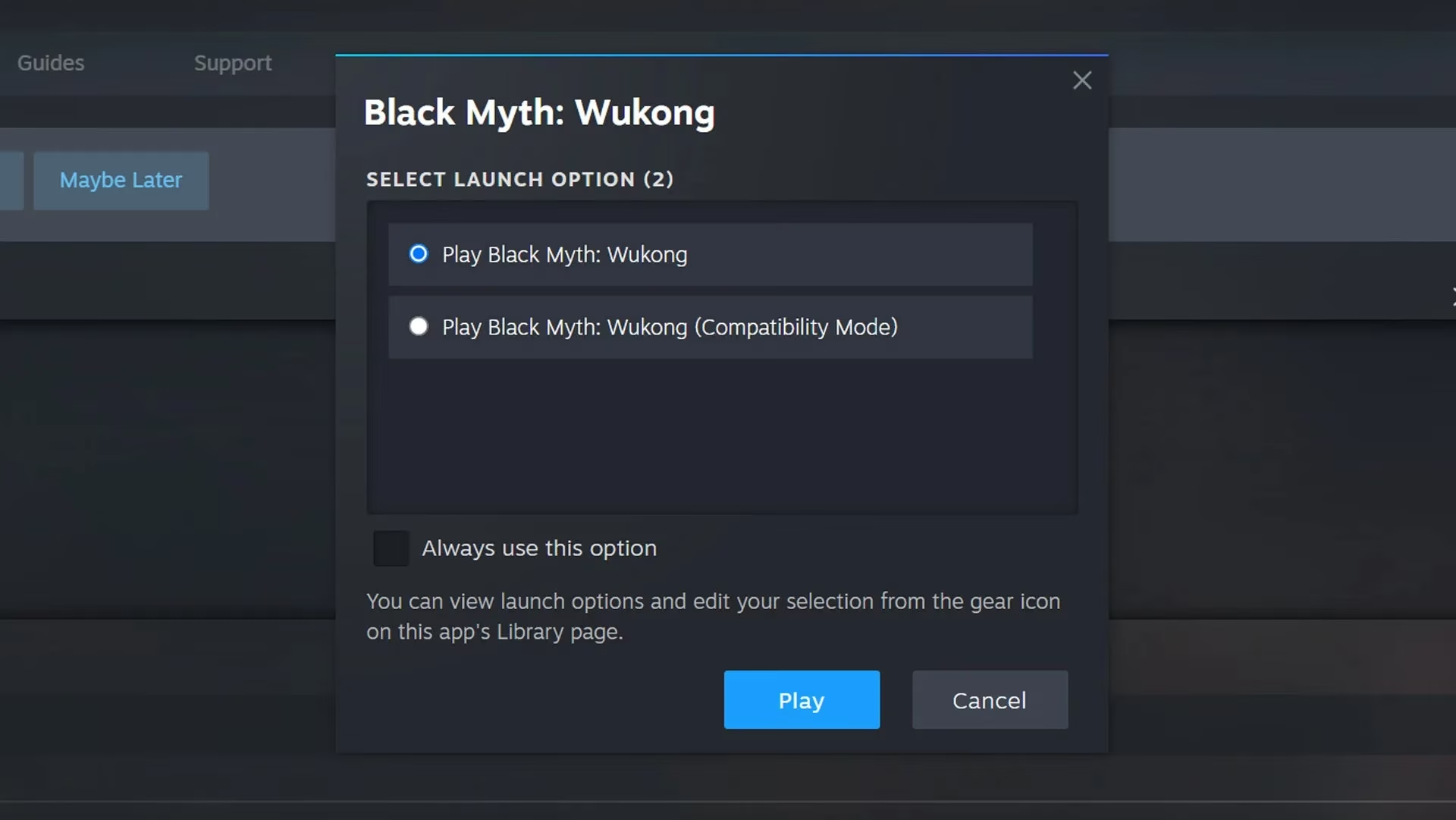
Boom! A pop-up window should appear, presenting you with a choice worthy of a sage:
-
Play Black Myth: Wukong (The standard, full-fidelity experience)
-
Play Black Myth: Wukong (Compatibility Mode) (The stable, accessible path)
-
-
If you're having issues, click the second option. Simple as that!
What if the pop-up doesn't show? No panic! Right-click on the game in your library, select 'Properties...', and under the 'General' tab, you'll find the launch options. You can set your preference there permanently or until you change it back.
For Epic Games Store Users:
-
Navigate to your Library.
-
Find Black Myth: Wukong and click on the three dots (...) next to it.
-
Select 'Manage'.
-
Scroll down a bit, and you'll find the section for 'Launch Options' where you can enable compatibility mode.
Remember, you can switch between these modes anytime by just restarting the game and making a different choice. It's not a permanent curse!
Once You're Up and Running...
Alright, so compatibility mode has worked its magic, and you're finally exploring the beautiful, perilous world. Phew! Now the real fun begins. Don't just stumble from one boss fight to the next—be strategic! The game is packed with secrets and powerful abilities waiting to be unlocked. Make it a mission to find every Keeper's Shrine you can; these places are often gateways to essential upgrades and lore. And for heaven's sake, don't ignore the skill tree! Seeking out the best skills for your playstyle can turn a grueling battle into a triumphant spectacle. Whether you prefer smashing things with a giant staff or using clever magical transformations, there's a build for you.
So, there you have it. Compatibility mode might not be the glamorous, high-octane way to play Black Myth: Wukong, but for many, it's the only way to answer the call to adventure without buying a whole new PC. It's the unsung hero in the background, making sure the show goes on. Now get out there and start your journey—the Monkey King's legacy isn't going to experience itself!